7 Elements of Scroll-Stopping Job Ads on Social Media: How to Make an Ad that Attracts Candidates Like a Magnet

Let’s face it: creating job ads on social media is like trying to get noticed at a concert where everyone’s waving neon signs. You’ve got seconds to grab attention before the scroll happens. So how do you create an ad that says, “Hey, stop scrolling! I’m worth your time”? Simple: make it pop, make it clear, and make it irresistible.
Here are the 7 essential elements to ensure your job ad stands out, with some tips and laughs to keep things light.
1. It Has a Dynamic Format
Forget boring static posts; Next-Gen talent is all about movement. GIFs, short videos, carousels—anything that screams, “This isn’t your average job ad.”
Why it works: Movement catches the eye faster than text or still images.
Best Practice: Use a quick video of your office (or home office setup for remote roles). Bonus points if it includes a dog. Everyone loves dogs.
Pro tip: Don't overcomplicate it — no one’s expecting a Hollywood production. A snappy 5-second clip of your team high-fiving can work wonders.
2. Eye-Catching Colours and Highlights
Here’s the truth: beige doesn’t belong in your job ad. Use bold, contrasting colours that draw attention. Think neon yellow, bold blues, or even your brand’s signature palette (assuming it’s not beige).
Why it works: Bright colours = dopamine. Dopamine = pause in scrolling.
Best Practice: Use highlights to draw attention to keywords like “Remote Role” or “4-Day Workweek!”
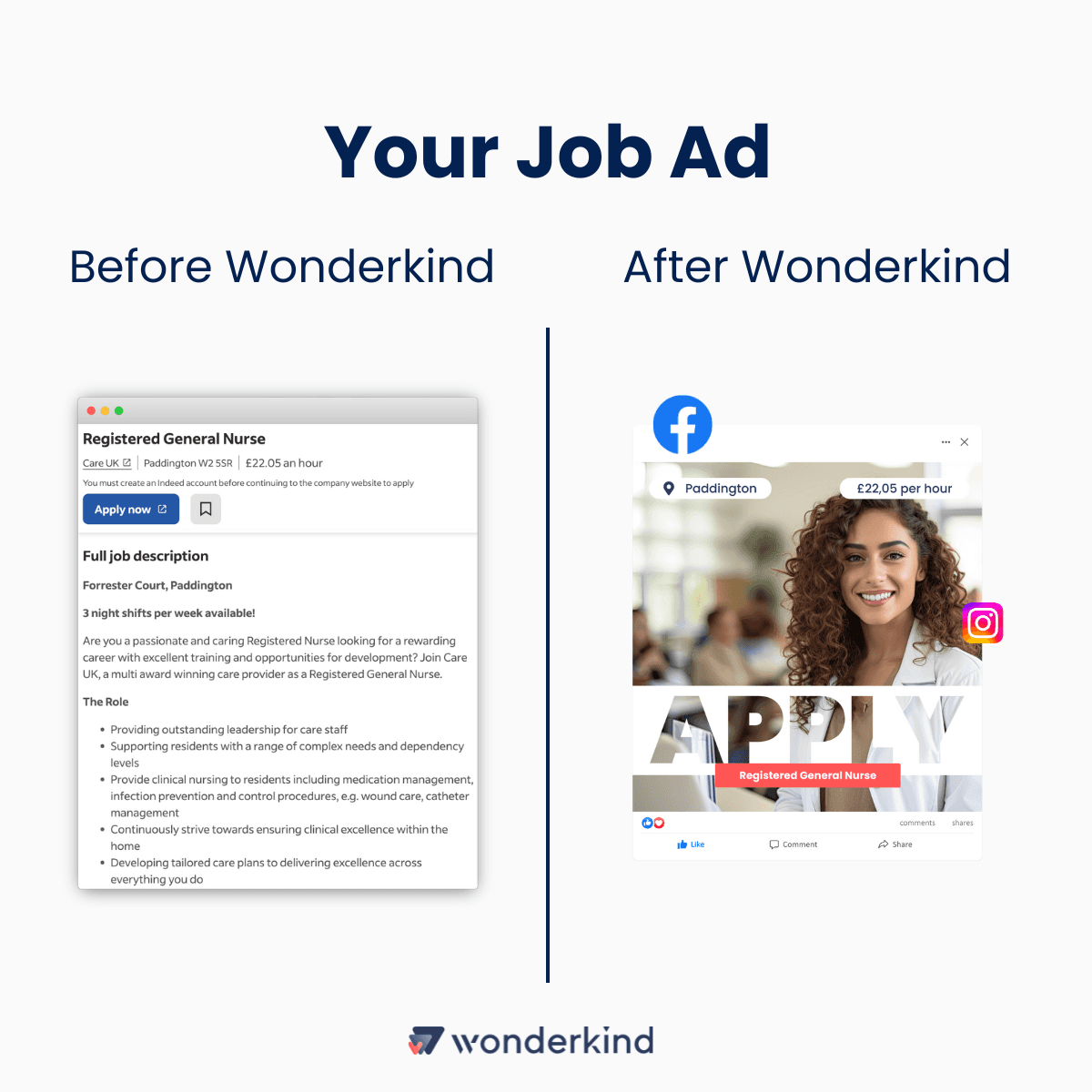
Pro tip: Use Overlay Ads - they are fast to create, you can re-use them, and they provenly work.
Here is an example for you. Be honest, which ad is more attention-grabbing and appealing to you?
3. Assume No One Will Ever Read the Copy
This might sting, but most people will skim. Your first three words should hit harder than a double espresso. Think: “Dream Job Alert!” or “Apply Now!”
Why it works: People scroll fast. A killer headline makes them pause.
Best Practice: Bold your hooks. Showcase key job information that can be scanned from the first glance by the potential employee
4. Yet If They Do Read It, Make It Engaging
So, they’ve stopped scrolling and decided to read. First, congrats—you’re ahead of 90% of other ads. Now, reward their attention with details that matter.
Include salary (don’t make them guess — it’s 2025!).
Highlight perks (“Yes, we have Friday pizza parties, but also real growth opportunities”). This is especially important for Next-Gen who value benefits that the job provides, preferably those that go beyond
Pro tip: Humor works wonders. Instead of “We value teamwork,” try: “We work hard, play hard, and sometimes debate which pizza topping reigns supreme.”
5. A Clear CTA (Call-to-Action)
You’ve hooked them; now tell them what to do next. “Apply now” is great, but you can add some more urgency or personality.
Why it works: A good CTA turns curiosity into action.
Best Practice: Try something like this in your copy “Your dream job is one click away — don’t ghost us!”
Pro tip: Place your CTA at the end or mid-ad for extra visibility.
6. Corresponding Image
We get it; finding the perfect stock image is a headache. But trust us, it’s worth it. Your image should connect emotionally with the job seeker.
Why it works: Humans are visual creatures. A great image stops thumbs mid-scroll.
Best Practice: If you use an AI image generator, make sure the person on the ad does not have 6 fingers. Definitely go for a smiling person as this positivity transcends to the association with the workplace.
Pro tip: Avoid overused stock photos like “random handshake under fluorescent light.” Unless you’re hiring for “office handshake enthusiast,” it’s a no-go.
7. Lead Forms
A scroll-stopping ad is great, but if you’re sending candidates on a scavenger hunt to apply, you’ve lost them. Instead, use Lead forms that allow people to apply without being re-directed to an external platform.
Why it works: They make applying quick and painless (ne-click simplicity).
Best Practice: Pre-fill fields when possible and keep it short—name, email, LinkedIn profile. In fact, 59% of Millennials and 62% of Gen Z use their phone to apply for jobs. Of course, no one wants to upload a resume from their phone on the train, or - even worse - craft a personalized cover letter.
Bonus tip: Add an auto-response that feels personal: “Thanks for applying! We’ll get back to you faster than you can say ‘recruitment.’”
The Final Word
Social media job ads are a science and an art. It’s about balancing attention-grabbing visuals with practical info and making sure the application process is smoother than your morning coffee run.
So, next time you sit down to create a job ad, ask yourself: Would I stop scrolling for this? If the answer is no, tweak it until the answer is an emphatic yes.
Want to automatically create job ads that people actually notice and directly launch them on socials? Wonderkind is just the perfect platform to do so. Book a 15-minute free demo in which you will learn how you can lower your sourcing costs by 45%, get 5x more reach on job ads and reduce time spent sourcing by 70%.
Related articles
Never miss a post
Ready to write your own results?
Tell us what you need to hire and we'll show you what Wonderkind can do for your roles.
No credit card required